Descrizione
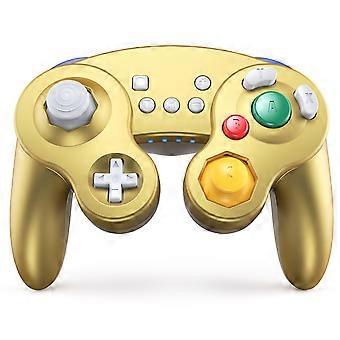
Upgraded Exlene gamecube controller switch, Wireless Switch Controller Joystick Gamepad For Nintendo Switch/Lite/Windows,wakeup
Upgraded Exlene Gamecube Controller Switch
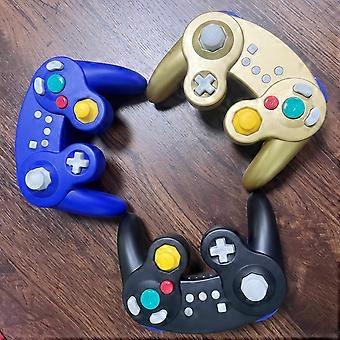
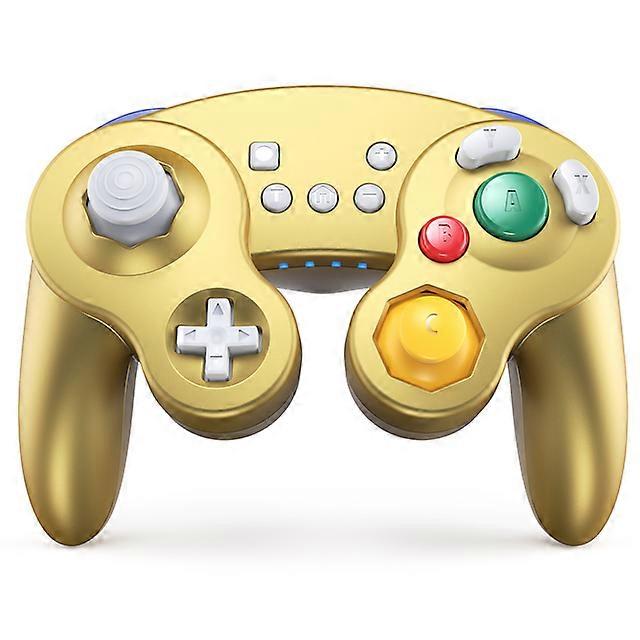
If you want to recapture the good old days in Smash or want as close to a Gamecube experience without a Gamecube as you can get, you cant go wrong with this Wireless GameCube Nintendo Switch Pro Controller. This Super Smash Bros Switch Controller date all the way back to your days with melee in the mid 00"'"s. It is a nostalgic controller in GameCube style, reminding you of your student years playing old school games all night long. It is also a switch controller allowing you play Smash and all switch games on switch/pc/android/ios.
Basic Features
-2022 newest upgraded version;
-Bluetooth communication;
-Compatible with: Switch, Switch Lite, OLED, PC, IOS, Android, Steam;
-Improved C-stick;
-Rechargeable internal battery via USB-C;
-Gyro functionality;
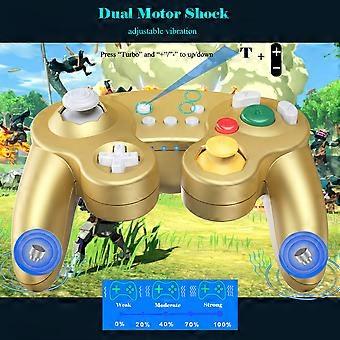
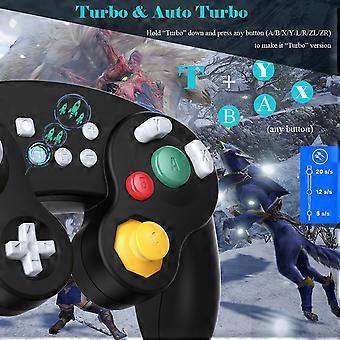
-Adjustable turbo and auto turbo; Adjustable Rumble/Vibration;
-Mildly improved D-pad;
-Can be charged from Switch while playing on it;
-Built-in rechargeable battery: 480mAh; 20+ hours of battery life.
-Weight: 184g
-Triggers are not analog; Responsive,Fast-action L/R & ZL/ZR Buttons,.
-The added shoulder buttons are a nice touch and make it comparable to an Xbox 360 controller for retro gaming.
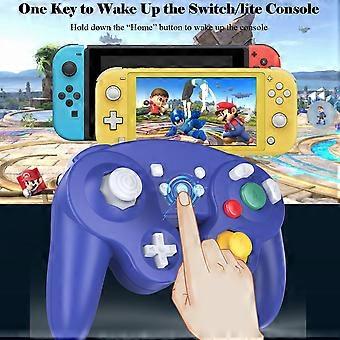
One Key Wake-Up
This gamecube switch controller support clicking the Home button to wake up the switch system when the game console is in sleep mode. Pairing is easy.
Gyro Functionality
With the six-axis gyro sensor, this pro controller switch will ensure a precise direction control with sensitive and immersize expericence on all motion sensoring games.
Turbo, Auto Turbo & Adjustable Rumble
Its turbo function is available by holdingT"button and pressing any botton (A/B/X/Y/L/R/ZL/ZR) to come to Turbo version; Do it again to make the button you choosed to Auto Turbo. 3 levels (20s/s, 12s/s, 5s/s) are to meet different needs of different action shooters. This Wireless Switch Controller has a built in dual motors for vibration features by pressT"button and+"or-"to up and down the rumble feel you need. Five levels are for your choice.
A,B,X,Y button Swap
You don"'"t have to endure the button Chaos when playing PC game by using this switch wireless controller. Just hold down A.X.B.Y together to swap the buttons"'" bindings with the replacement typical of Xbox controllers.
More Features:
-Full Button Layout with Switch Pro controller &: This Bluetooth Gamecube Controller is designed to recall the look and feel of a GameCube controller, but also let players have fun with Super Smash Bros and other switch games (Mario Kart 8 Deluxe, Splatoon, Super Mario Odyssey, The Legend of Zelda,Breath of the Wild...etc).
-Work easily on PC: This switch controller also syncs up very quickly on PC by a bluetooth dongle. (the dongle is not included in box. please purchase individually)Just plug in, press and hold the sync buttons, your PC/laptop will register the Wireless Gamecube Controller.
-High Precision Joysticks: 360 no-dead zone joysticks and zero-delay keys are to improve user"'"s gaming configuration and feel. The whole controller fit exact to your palm naturally with more comfortable holding feeling, it has ergonomics design
-Screenshot Functionality: . This Gamecube Nintendo Switch Controller has a screenshot button, you can capture and save screenshots of many screens, including scenes during gameplay.
Enjoy it!
Basic Setting:
1How to connect with Switch/Switch Lite console?
Just simply go into the Controller menu on your Nintendo Switch/Switch Lite.
Go to theChange Grip/Ordersub-menu.
Hold down the Home button on the controller till the below blue light flash.
Press L + R button
Press A button when you are ready.
Connected!
2,
How to wake up the switch?
holddowntheHomebuttonto
waketheNintendoSwitchfromsleepmode,
thecontrollerimmediatelyregistersascontrollernumberone.
3,
How to set Turbo and Auto Turbo function?
HoldTurbo"down and
press any button(A/B/X/Y/L/R/ZL/ZR) to make that button become a Turbo
version of the button in question that repeatedly presses over and over again
when you hold it down.
Enter Turbo function.
Do it again to make the button an always on Turbo button
Enter Auto Turbo.
Do it a third time to
-
ID Fruugo:
211019265-449773285
Informazioni sulla sicurezza del prodotto
Si prega di consultare le informazioni sulla sicurezza del prodotto specifiche per questo prodotto descritte di seguito
Le seguenti informazioni sono fornite dal rivenditore terzo indipendente che vende questo prodotto.
Etichette di sicurezza del prodotto

Avvertenze di sicurezza:
important Safety Instructions Read Before Use: Please read all instructions and safety warnings before using this product. Failure to follow these guidelines may result in injury, damage, or malfunction. General Warnings Intended Use: Use this product only for its intended purpose as described in the user manual. Supervision Required: This product is not intended for use by children or persons with reduced physical, sensory, or mental capabilities without supervision. Inspection Before Use: Check for any signs of damage or wear before use. Do not use if damaged. Usage Precautions Environment: Do not use in wet, damp, or flammable environments unless specified as safe for such conditions. Proper Operation: Follow all operating instructions carefully. Avoid improper handling or misuse. Power Source: Use only the recommended power supply or batteries. Do not exceed specified voltage or current ratings. Maintenance and Care Cleaning: Disconnect from power before cleaning. Use only manufacturer-recommended cleaning methods and solutions. Storage: Store in a cool, dry place away from direct sunlight and extreme temperatures. Repairs: Do not attempt to disassemble or repair the product. Contact authorized service personnel for assistance. Specific Warnings Avoid Hazards: Keep the product away from sharp objects, water, and heat sources. In Case of Malfunction: If the product malfunctions or exhibits unusual behavior, discontinue use immediately and contact customer support. Disposal Instructions Recycling: Dispose of the product in accordance with local electronic waste disposal and recycling guidelines. Battery Disposal: Follow specific regulations for the safe disposal of batteries if included.